
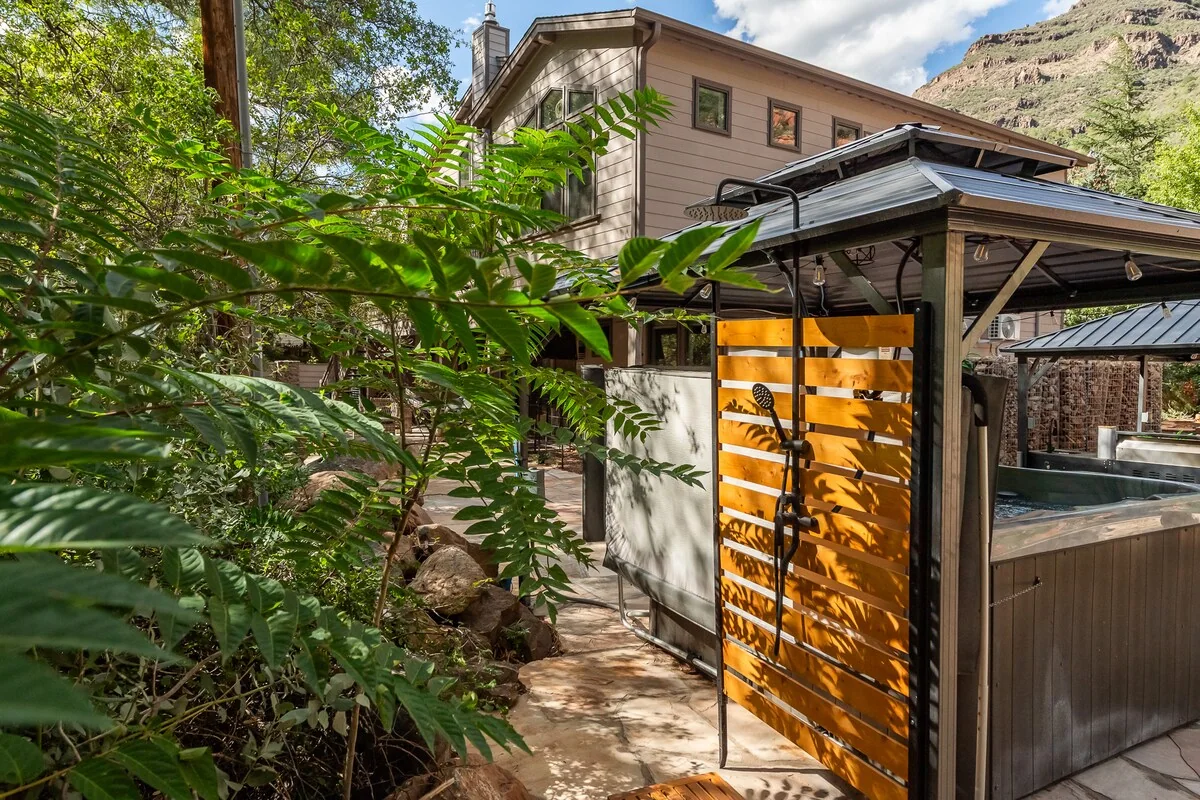
Red Rock North / Guest guide
Make yourself at home.
A quick guide to arriving, settling in, and enjoying your time in Oak Creek Canyon. Keep your Airbnb reservation handy for your private stay details.
Start here
Connect to Wi-Fi
To connect your phone, tablet, or laptop:
- Select this networkstayinsedona
- Enter this passwordparadise
Welcome to the canyon.
We hope your days here feel easy. This public guide covers the basics; your confirmed Airbnb reservation and host messages have the exact address, access details, timing, and house rules for your stay.
01 / Plan ahead
Before arrival
Review the trip details and messages attached to your Airbnb reservation before you travel. They are the place to find your confirmed check-in time, directions, parking instructions, and the most current house information.
- Share the arrival details with everyone in your group.
- Allow extra time for the drive through Oak Creek Canyon, especially during busy travel periods or changing weather.
- Check the weather and any travel advisories if you plan to explore the creek or trails.
02 / Settle in
Getting in
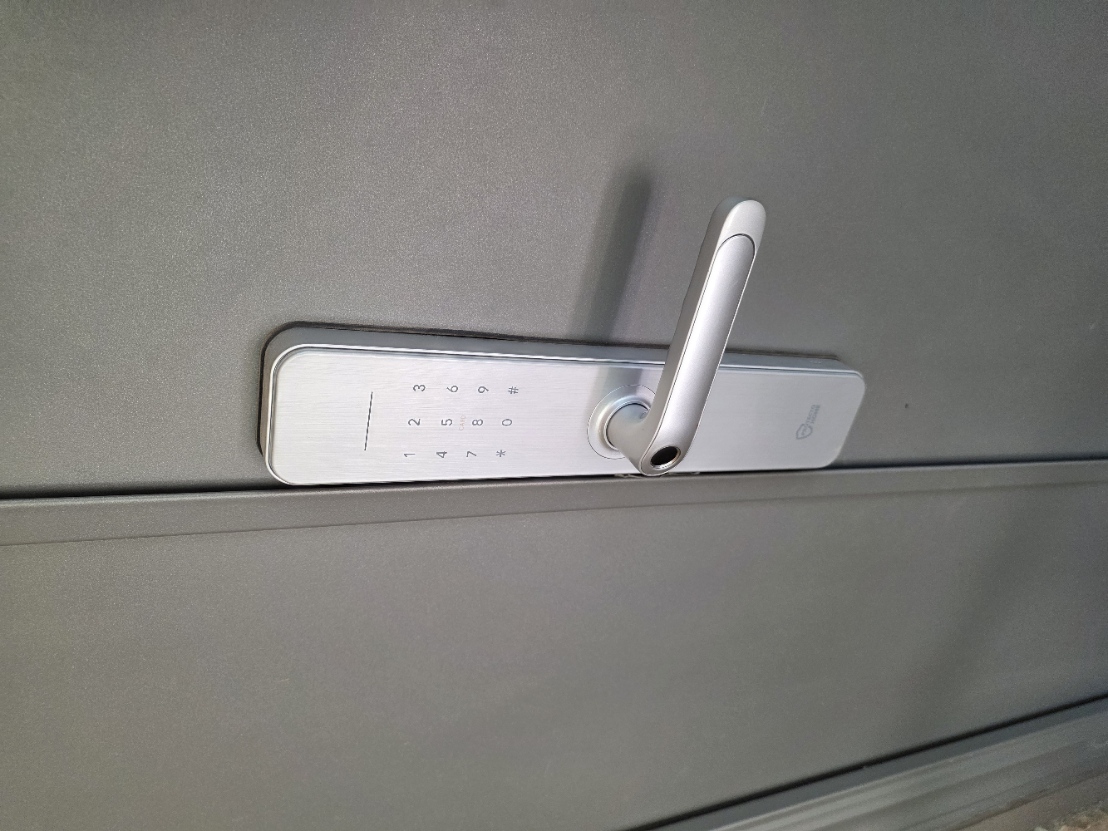
Use the front door keypad below. Check your Airbnb trip messages for the latest arrival details. If you have trouble entering the home, message the host through your trip before trying an unfamiliar entrance.
Front door keypad
- Activate the keypad on the front door.
- Enter 8000# on the keypad, including the # key. The door should unlock; turn the handle to open it.
- The door locks automatically every time it closes. Keep the code with you whenever you step outside, and make sure the door latches behind you.
The exact address, check-in time, and any updates to the entry instructions are shared with confirmed guests through Airbnb. Open your trips on Airbnb ↗
03 / Enjoy the space
Around the home
Red Rock North has room to gather, cook, and unwind, with three bedrooms, a kitchen, laundry, and shared living spaces. Refer to the instructions at the home and your booking messages for how to use any specific equipment.
- Keep doors and windows secured when you leave.
- Be considerate of neighbors and the canyon setting.
- Contact the host through Airbnb if something is missing, damaged, or not working as expected.
Folding glass doors
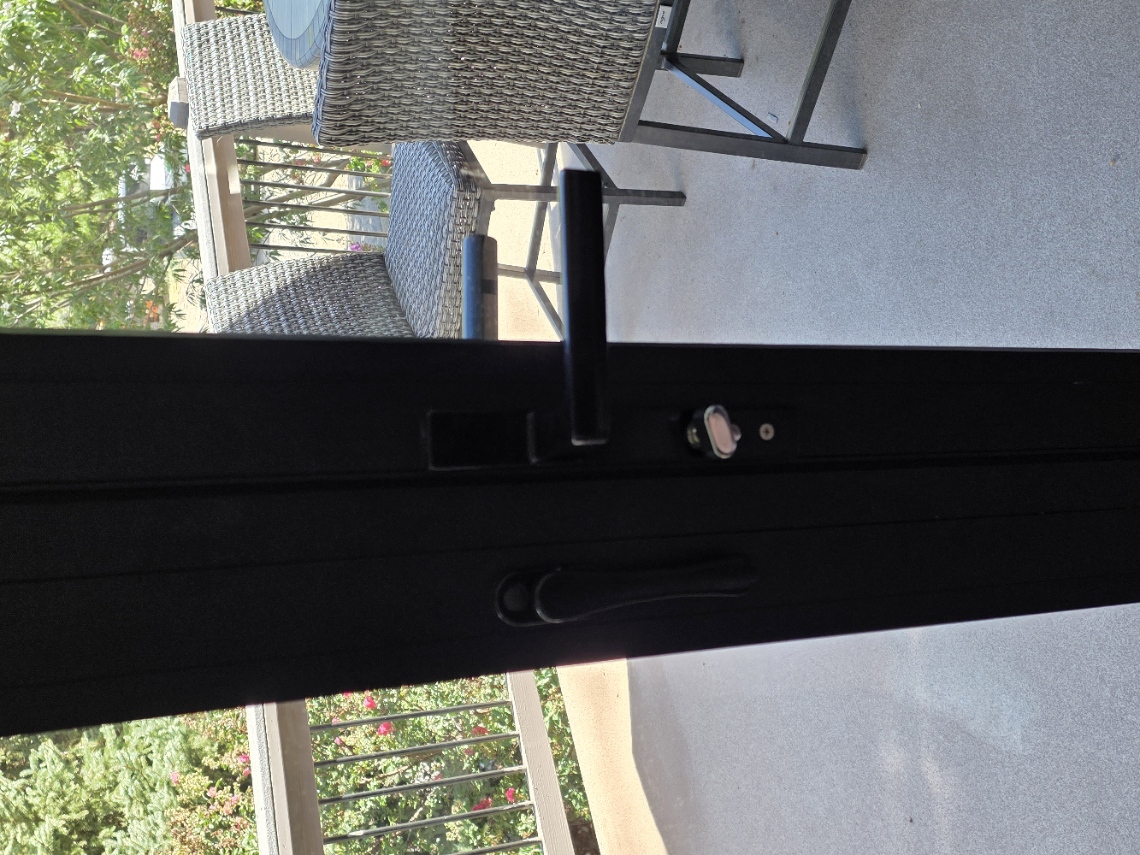
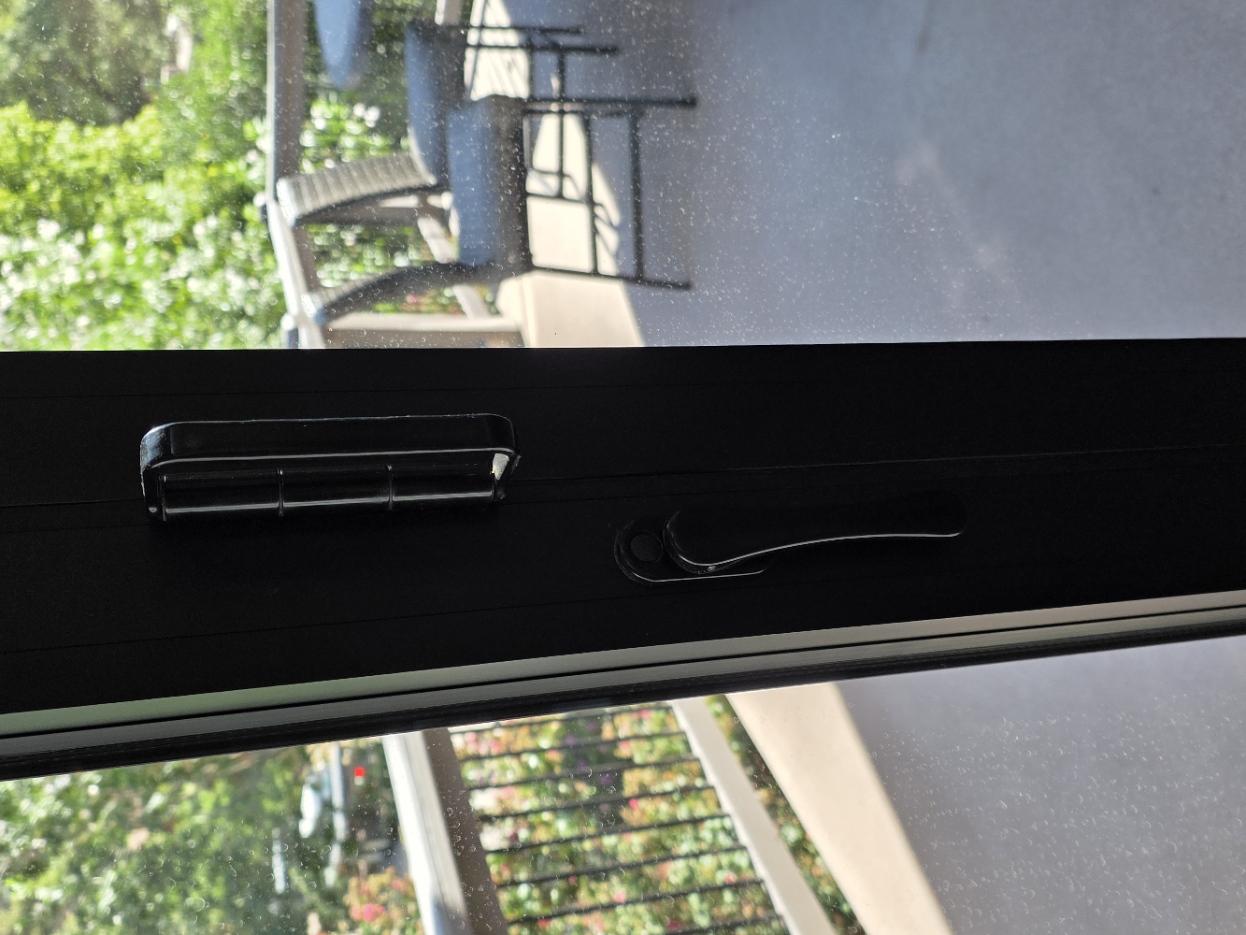
There are two three-panel sets of glass doors, one on each side. You can use the main door by itself, or open the panels for a wide opening to the deck.
- At the center of the closed doors, unlock the main door using the small silver lock beneath the horizontal black handle (photo 1). Open the main door first.
- To open the full wall, find the slim vertical release lever on each inner panel (photo 2). Move the levers to their unlocked positions.
- Gently push the released panels outward toward the deck to start the fold, then move each three-panel set back toward its side in an accordion motion. Keep hands clear of the hinges. If a panel resists, check its lever rather than forcing it.
- To close, bring the panels back into line, secure the inner-panel levers and the main door, and check that everything is latched.
Power outages & circuit panels
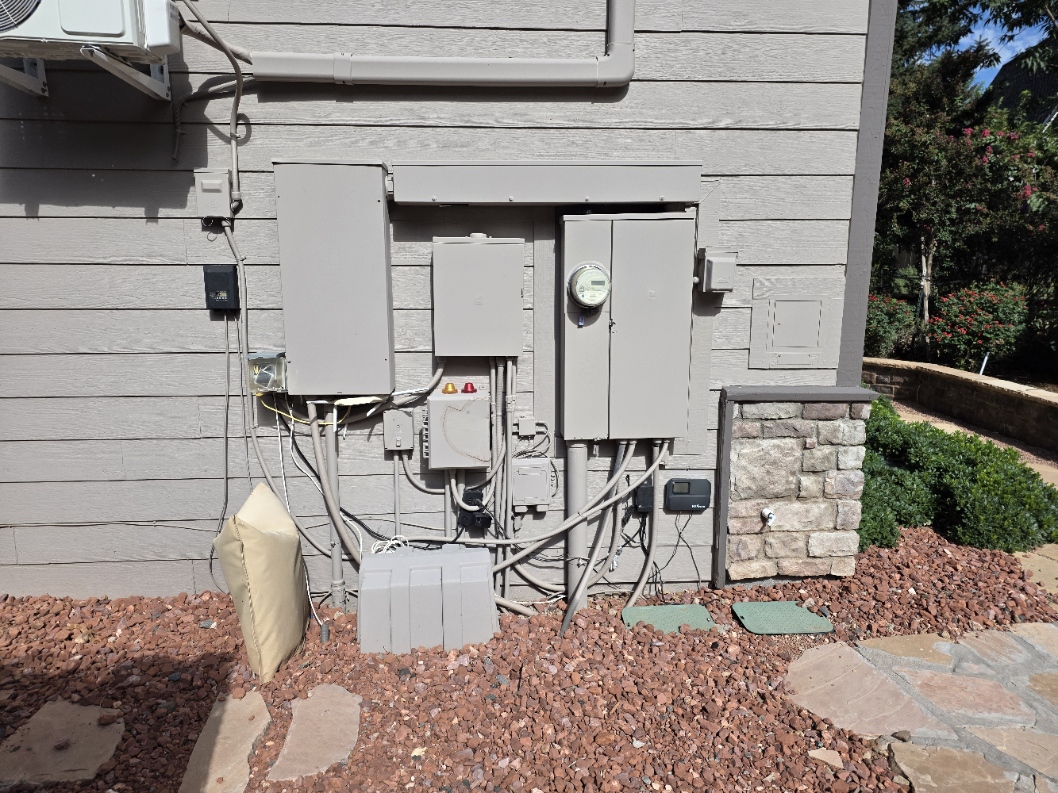
The whole-home generator is located to the left of the area shown in the photo. During a utility outage, it starts automatically and supplies the home’s essential circuits until regular power is restored. Nonessential circuits may remain off while the generator is running.
If only one area or appliance has lost power, check the labels and breaker positions in both panels to identify the affected circuit. If you cannot identify the issue, message the host through Airbnb.
The generator operates automatically. Please leave its controls, the meter, and any exposed wiring alone. Do not remove panel covers or repeatedly reset a breaker. If a breaker trips again, or you notice heat, smoke, a burning smell, or sparking, move away and contact the host immediately.
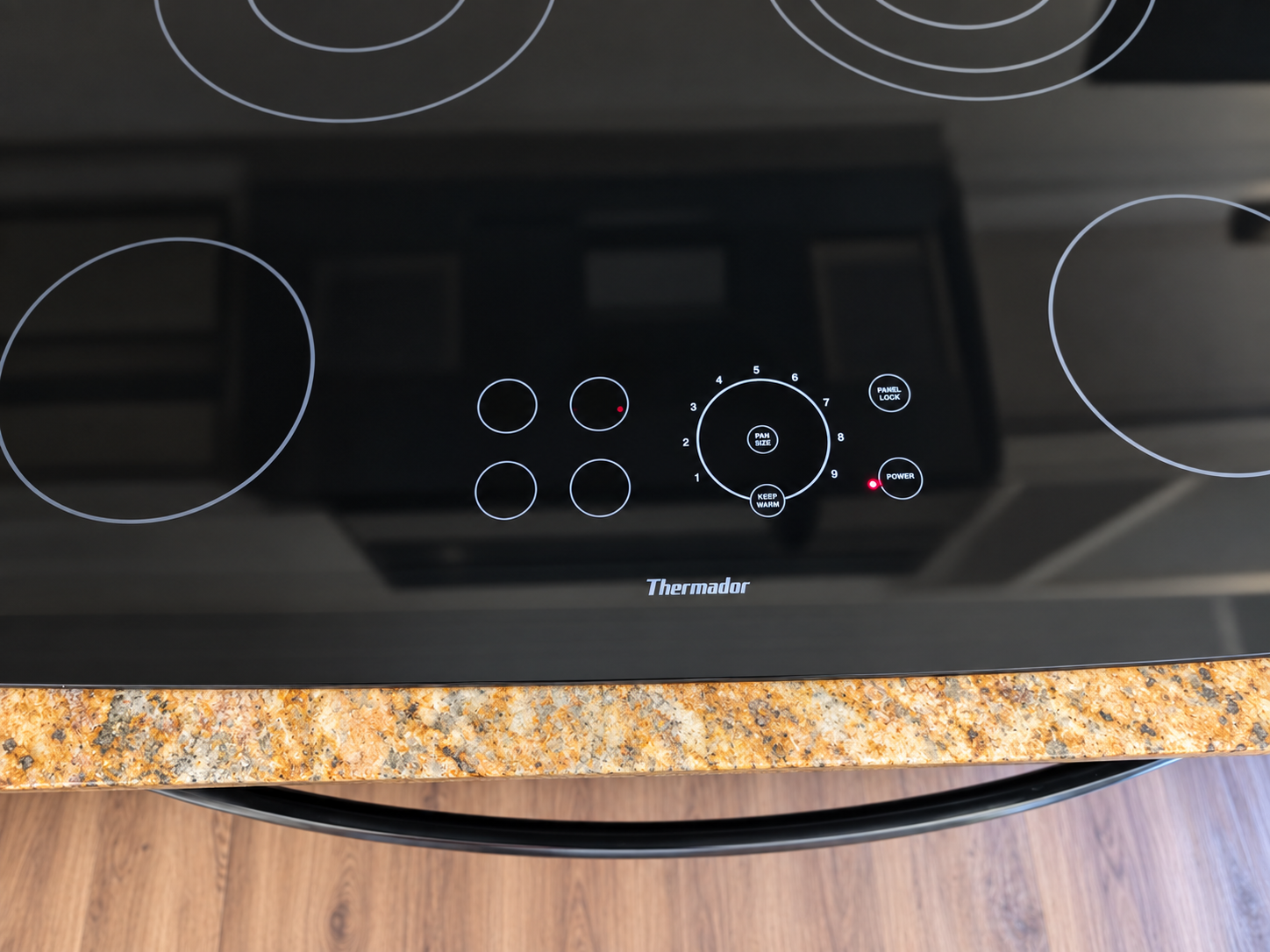
Stovetop
This Thermador glass cooktop has touch controls. The four small circles on the panel correspond to the burners by position.
- Center a flat-bottom pan on the burner you want to use.
- Tap the matching small circle on the control panel. A 0 should flash.
- If that burner has more than one ring, tap PAN SIZE to match the heated area to your pan. Then tap a number around the large circle to set the heat: 1 is low and 9 is high.
- To change the heat, tap the same small circle and then a different number.
- When done, tap that burner’s small circle twice to turn it off. Tap POWER to turn off every burner at once.
If the PANEL LOCK light is on, hold PANEL LOCK for three seconds to unlock the controls. An H in a burner display means the glass is still hot; wait until it disappears before touching or cleaning that area.
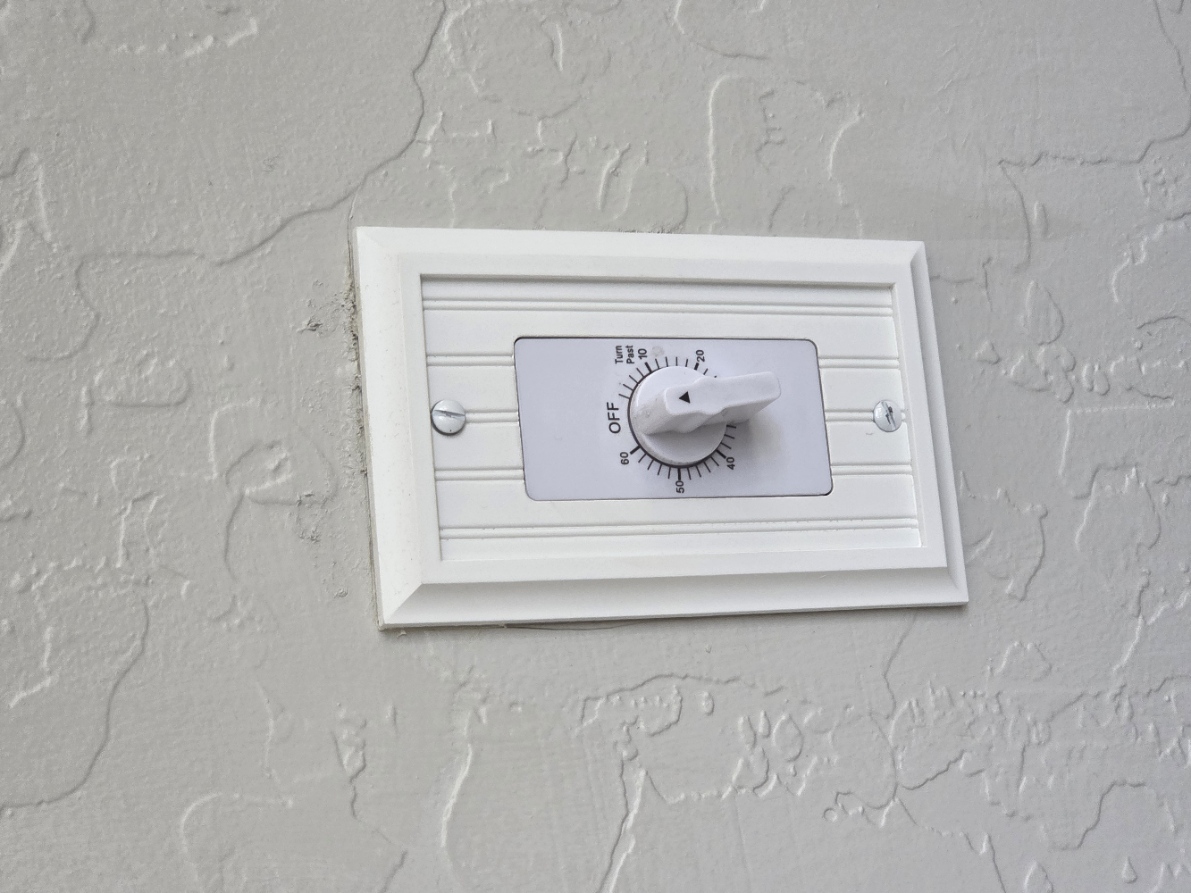
Fireplace timer
Find this timer on the wall between the fireplace and the master bedroom.
- Turn the dial from OFF to the time you want. The fireplace will turn on automatically.
- When the timer runs out, the fireplace will turn off automatically.
04 / Canyon time
Outside & the creek
The decks, outdoor lounge, hot tub, and nearby Oak Creek make this place special. Follow any instructions posted at the property for the spa, grill, fireplaces, and fire features. Conditions and fire restrictions can change.
- Supervise children near water, on decks, and around hot surfaces.
- Use caution around Oak Creek. Water levels and currents can change after rain.
- Check Coconino National Forest alerts ↗ before heading onto nearby trails.
Back-deck grill
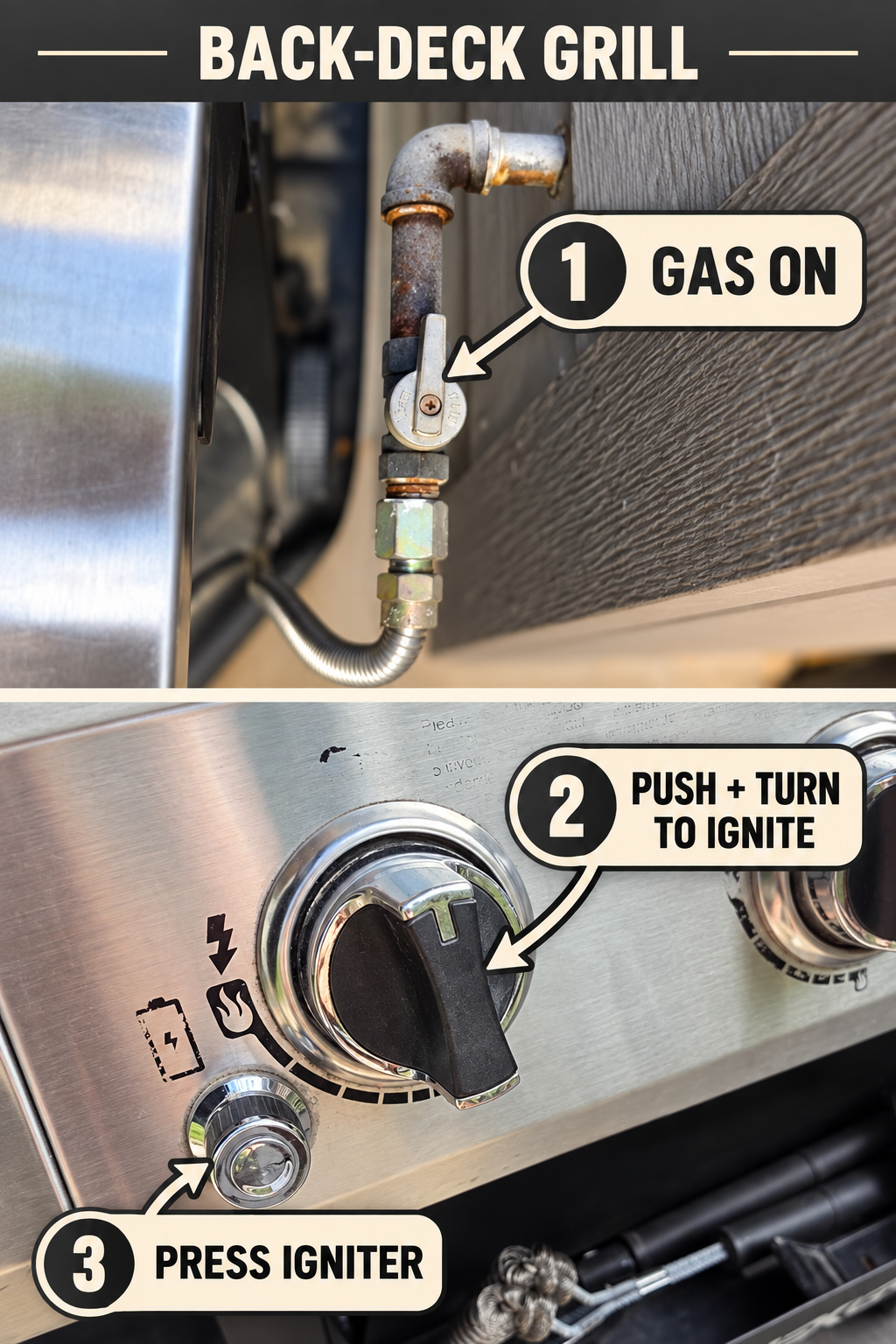
Open the grill lid before lighting. The gas shutoff lever is beside the grill, as shown in the first photo.
- Make sure the burner dials are OFF. Turn the gas shutoff lever so it is in line with the vertical pipe to turn the gas on.
- Push in a burner dial and turn it to the ignite symbol.
- While holding the dial in, press the separate round igniter button until that burner lights. Release the button and set your cooking heat.
- After cooking, turn every burner dial to OFF, then turn the gas shutoff lever across the pipe to turn off the gas.
If a burner does not light within a few seconds, turn its dial and the gas supply OFF. Leave the lid open and wait five minutes before trying again. If you smell gas, do not try to light the grill; turn the gas off and contact the host.
Gas firepit
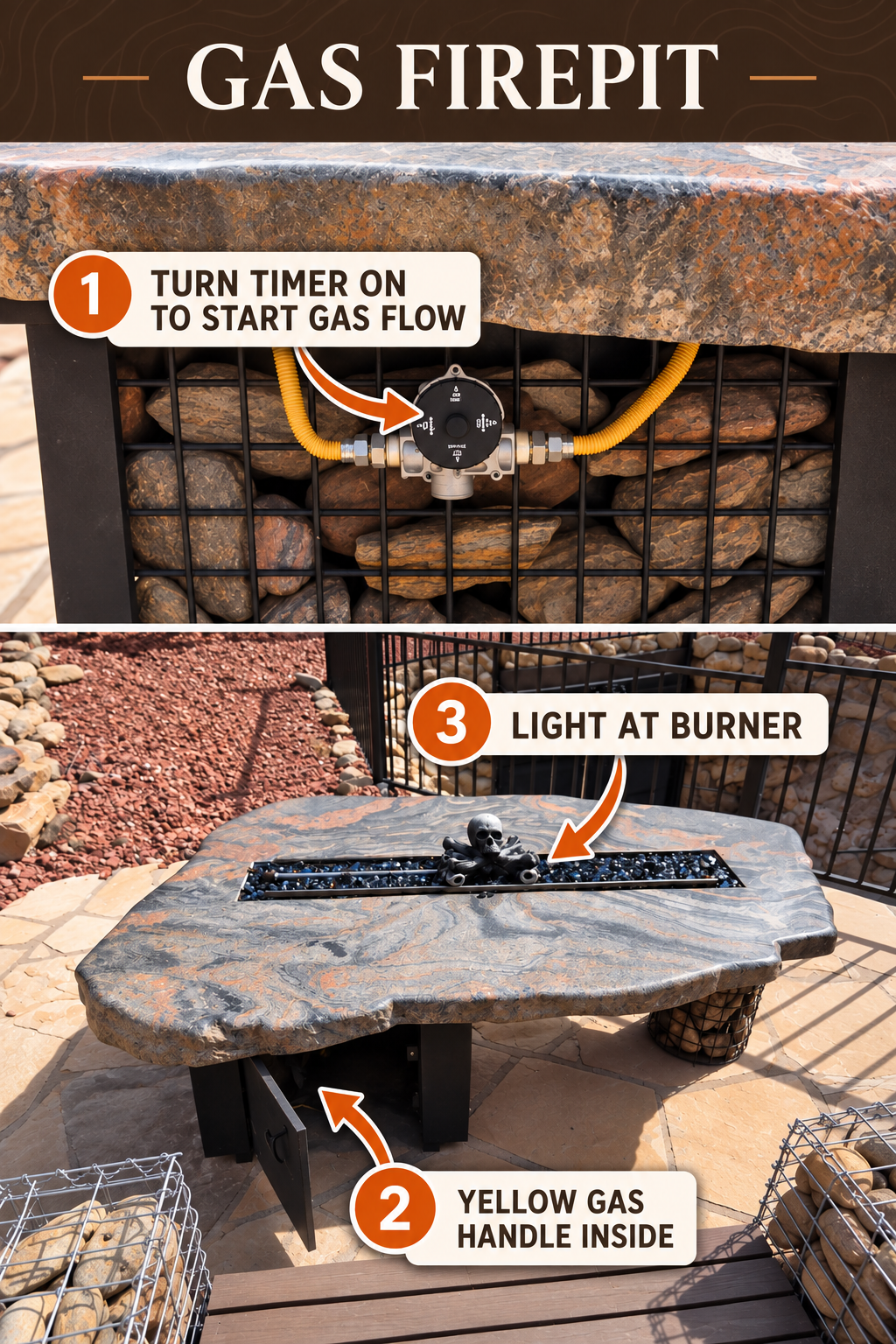
The round timer shown below supplies gas for the selected time. The yellow handle inside the front access opening controls gas flow to the burner. The handle itself is not visible in the photo.
- Turn the round timer ON to start the flow of gas to the firepit.
- Open the front access door beneath the firepit and locate the yellow gas handle.
- Light a long-reach lighter and hold its flame at the burner strip while standing to the side. Only then slowly open the yellow handle until the burner lights. Adjust the handle for a comfortable flame.
- When finished, close the yellow handle and turn the timer OFF. Let the firepit cool before touching it.
If it does not light, close the yellow handle and turn the timer off. Wait at least five minutes for any gas to clear before trying again. If you smell gas, do not light it; turn everything off, move away, and contact the host. Never leave the flame unattended or put anything on the firepit.
Outdoor fireplace & pizza oven gas
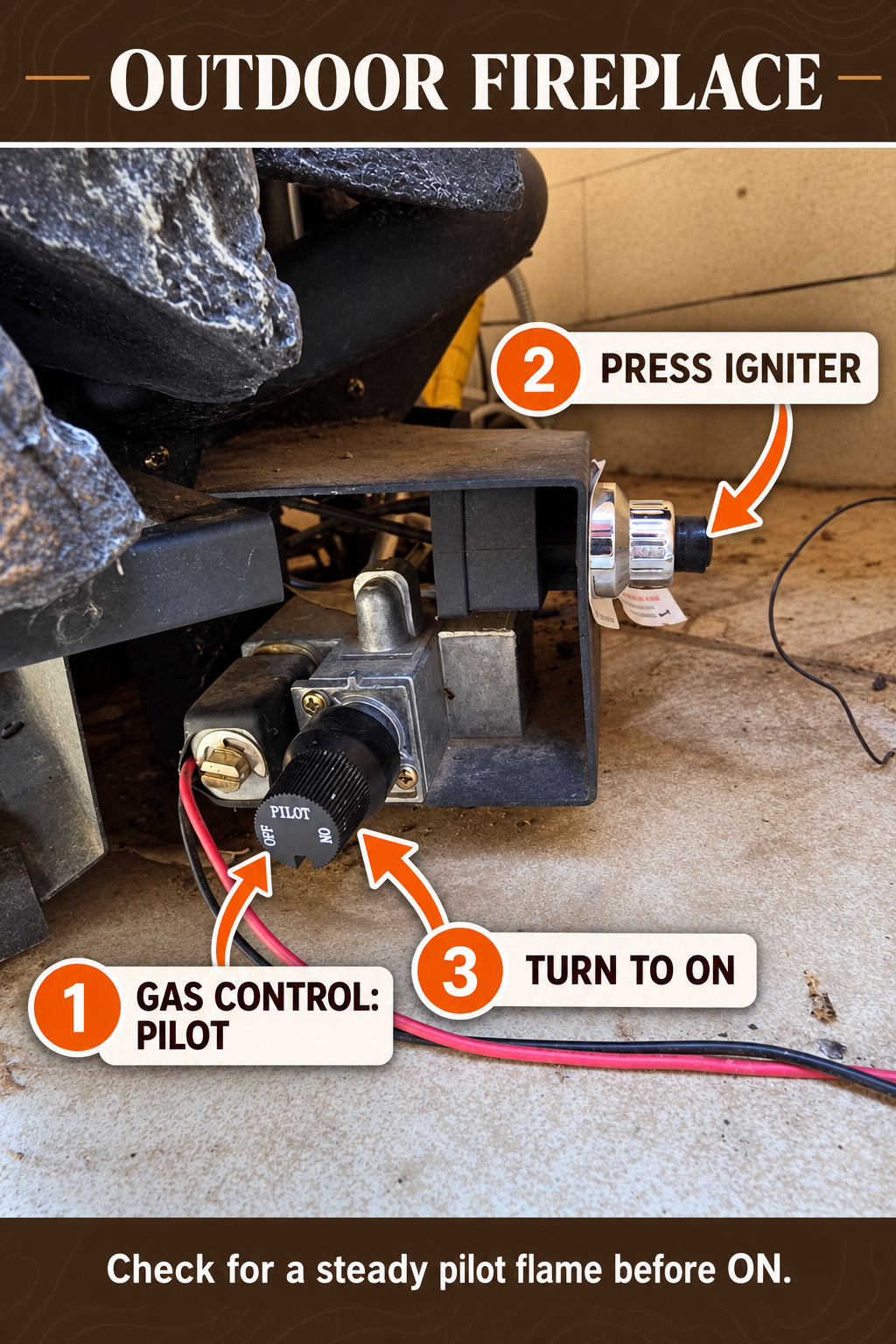
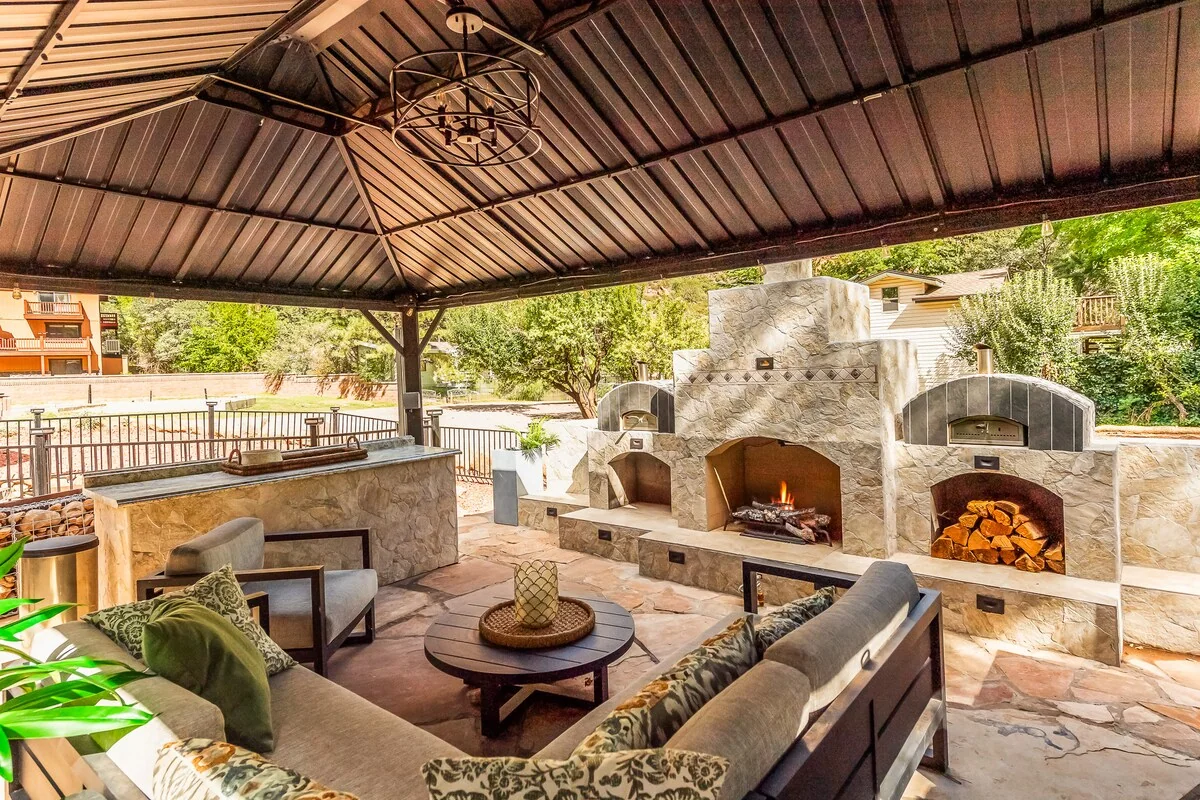
First, turn on the timer in front of the outdoor fireplace. It supplies gas to both the fireplace and the pizza ovens for the selected time; it does not ignite either appliance. The photo shows the separate fireplace controls: the large black knob marked OFF / PILOT / ON and the small black spark-igniter button at the far right.
Control location: The outdoor fireplace controls are at the back of the fireplace, on the right-hand side.
- Turn the shared gas timer ON for the time you need. Make sure there is no gas smell and the fireplace area is clear.
- To light the fireplace, push in the black gas-control knob and turn it from OFF to PILOT. Keep it pressed in.
- While holding the knob in, press the small black igniter button until you see the small pilot flame.
- Keep holding the gas-control knob for about one minute after the pilot lights, then release it. If the pilot stays lit, turn the black knob to ON to enable the main flame.
- When finished with the fireplace, turn its knob OFF. Turn the shared timer OFF when neither the fireplace nor the pizza ovens is in use. Let hot surfaces cool.
If the pilot does not light or stay lit, turn the fireplace knob OFF and wait at least five minutes before trying again. If you smell gas, turn the shared timer off, move away, and contact the host. If the main flame does not come on with the control at ON, leave it off and contact the host rather than changing other controls.
Two pizza ovens
Both ovens are beside the outdoor fireplace. The timer in front of the fireplace supplies gas to both ovens; each oven has its own lighting controls behind it. The timer only starts the gas supply. You do not need to light the fireplace to use an oven.
- Make sure both oven controls are OFF and the oven you want to use is clear. Turn the shared fireplace-area timer ON for the time you need.
- Go behind the oven you want to use and find its gas-control knob and igniter. Push in the knob and turn it slowly toward the marked IGNITE/START position. Keep the knob pressed in while you use its igniter: press the separate igniter button if there is one, or turn the knob until it clicks if the igniter is built into the knob. Look through the front opening for a burner flame. Once lit, keep the knob pressed for a few seconds, release it slowly, and make sure the flame stays on before adjusting the heat. If you need both ovens, repeat these steps at the second oven’s rear controls.
- Let the oven and pizza stone preheat for about 30 minutes. Use a pizza peel and heat-resistant protection around the hot opening and stone.
- When finished, turn each oven’s rear control OFF. Turn the shared timer OFF once the fireplace and both ovens are all off. Let the ovens cool before touching or cleaning them.
If an oven does not ignite promptly, turn its control OFF and the shared timer OFF. Wait at least five minutes for gas to clear before another attempt. If you smell gas or the rear controls do not match the steps above, leave everything off, move away, and contact the host. Do not use a lighter or change any other valves to try to start an oven.
Back-deck hammocks
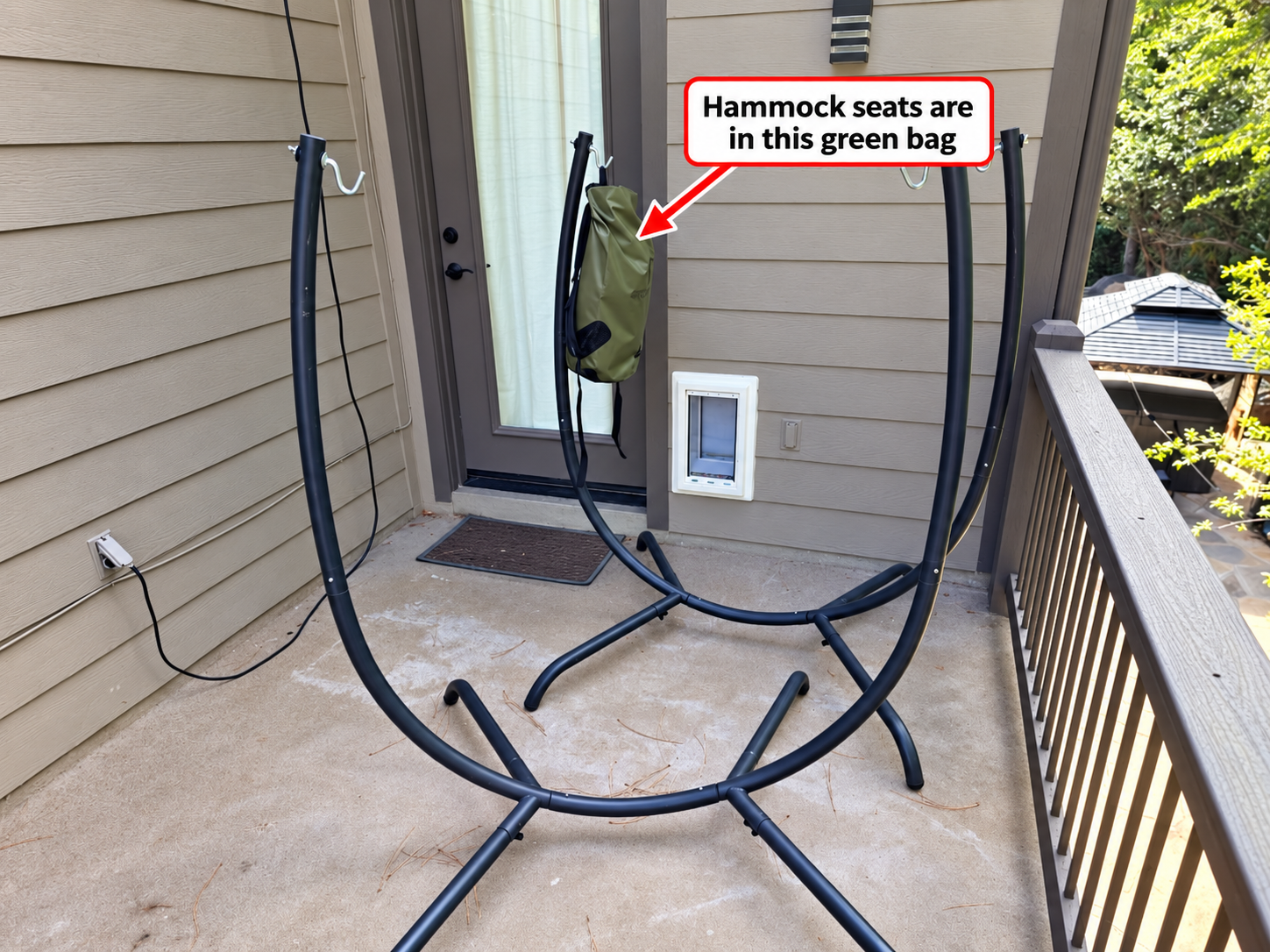
The hammock seats are in the green bag hanging beside the back-deck door. Please put the seats back in the bag when you leave.
Outdoor games
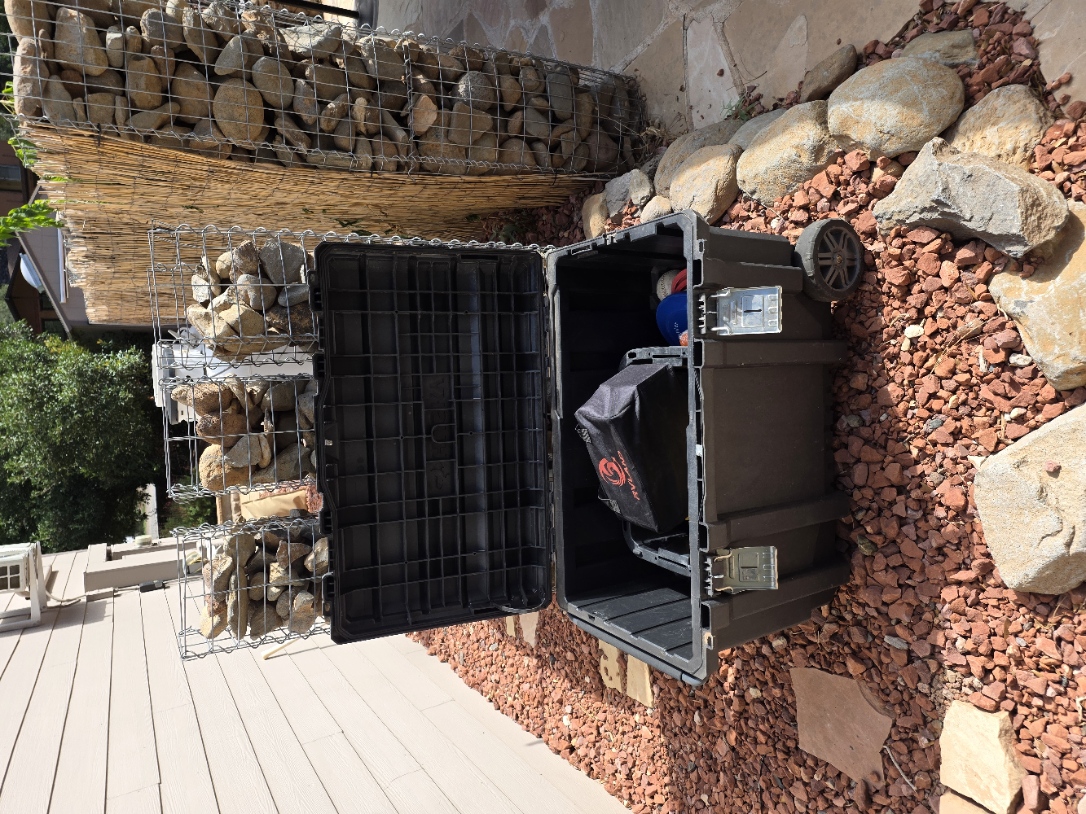
There are several outdoor games in the black storage box beside the house. Please enjoy them during your stay. When you are done, return every game and its pieces to the box, close the lid firmly, and fasten both front latches. Make sure the box is sealed before you leave.
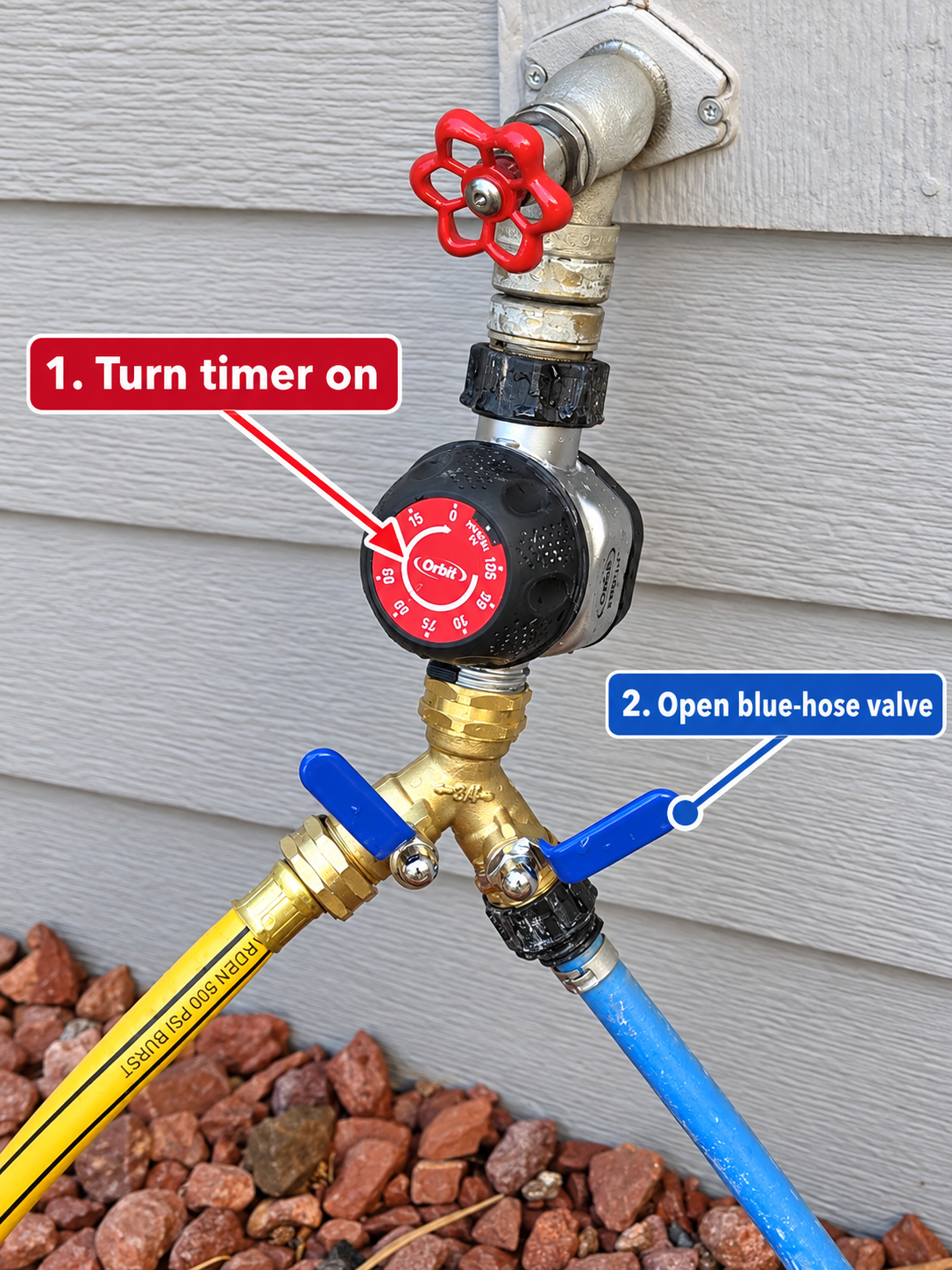
Outdoor sink water
- Turn the timer on using the red dial.
- Open the valve on the blue-hose side using the right-hand blue lever.
05 / Until next time
Departure
Follow the checkout time and any departure checklist in your Airbnb reservation or host message. Before leaving, gather your belongings, secure the home, and let the host know through Airbnb if anything needs attention.
06 / Here to help
Need help?
For questions about the home or your reservation, use the Airbnb message thread so your host can see the details of your stay. For an immediate emergency, call 911.
While you are here
A little time to explore.
Find trails, places to eat, and favorite Sedona stops in the local guide.
See things to do ↗